Devin vs Cursor vs Windsurf: Which AI Coding Workflow Fits?
Last updated: 2026-07-18
The confusing part of a Devin vs Cursor vs Windsurf comparison is that these are no longer three equivalent product names.
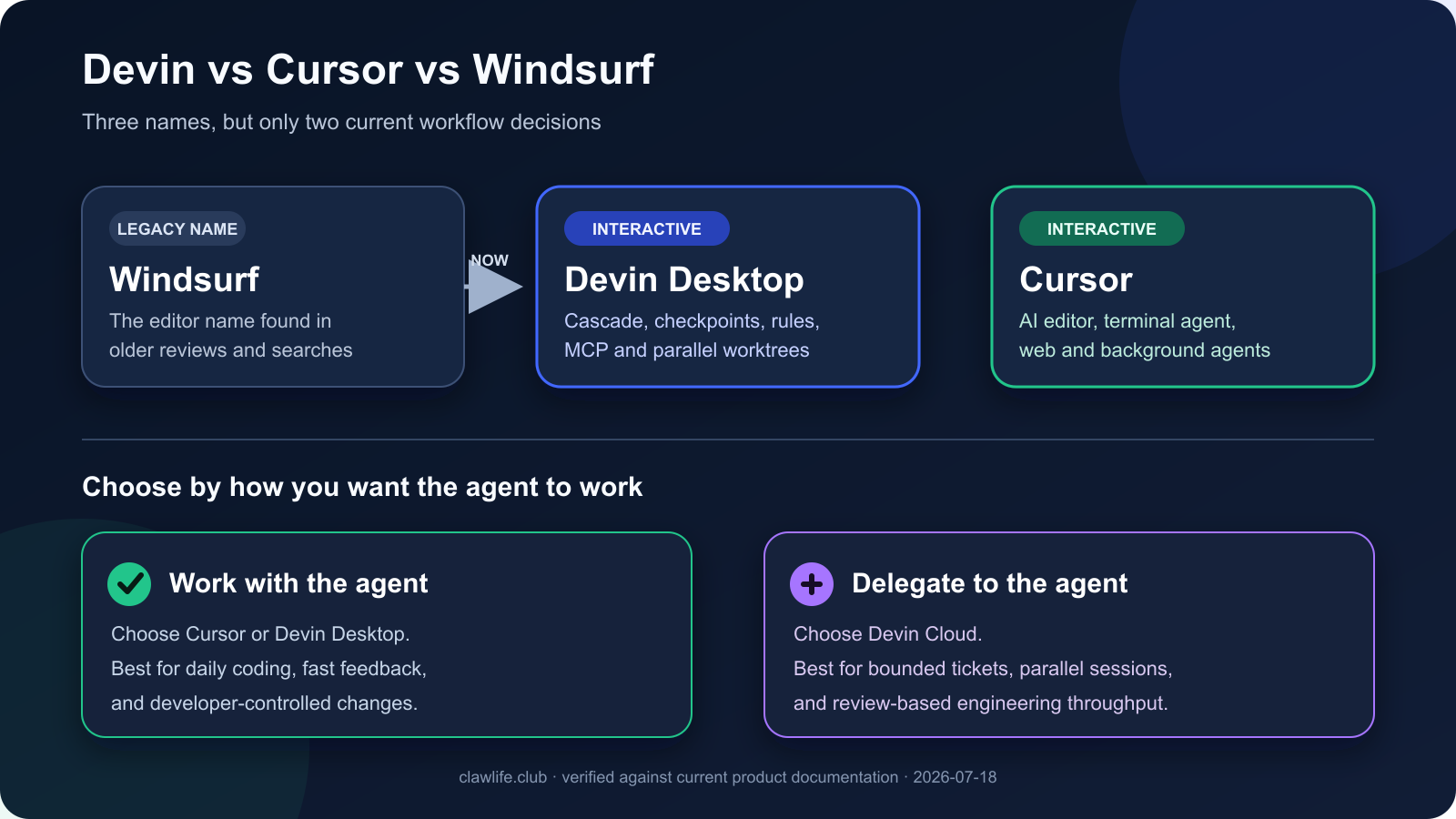
The editor previously known as Windsurf is now presented as Devin Desktop. Its Cascade assistant, editor workflow, checkpoints, rules, MCP support, and parallel worktrees live under that current name. Cursor remains a separate AI-native editor with local agents, a terminal agent, web and mobile agents, and background workflows. Devin Cloud is the more autonomous option: you delegate software tasks to remote sessions and review the resulting work.
That creates two real buying decisions:
1. Devin Desktop vs Cursor for developers who want AI inside a daily coding environment. 2. Devin Cloud vs an editor agent for teams deciding whether to delegate complete tasks instead of collaborating line by line.
Quick verdict
Choose Cursor if you want an AI-first editor for daily development, quick codebase questions, multi-file changes, terminal work, and a workflow that stays close to your local repository.
Choose Devin Desktop if you were looking for Windsurf and prefer Cascade's planning, checkpoints, worktrees, real-time editor context, and the wider Devin product direction.
Choose Devin Cloud if you want to hand off bounded backlog work, run several tasks in parallel, and return to proposed changes or pull requests instead of supervising every edit.
Do not choose between them from a feature checklist alone. The central question is where you want the agent to work and how often you want to intervene.
| Product or search term | What it means in 2026 | Where the work happens | Best fit | Main tradeoff |
|---|---|---|---|---|
| Windsurf | The legacy name people still use for the editor now presented as Devin Desktop | Local desktop editor | Buyers following older Windsurf reviews, tutorials, or searches | Older articles can make the current product structure look like three separate tools |
| Devin Desktop | The current desktop editor experience with Cascade | Local repository, editor, terminal, and isolated worktrees | Interactive coding with planning, checkpoints, and parallel editor tasks | Requires you to stay involved in the development loop |
| Cursor | AI-native editor plus CLI, web, mobile, and background agent surfaces | Local editor and terminal, with optional remote agents | Fast daily coding, repository exploration, edits, and developer-controlled execution | Parallel or long-running work still needs clear boundaries and review |
| Devin Cloud | Autonomous software-engineering sessions with an embedded IDE, shell, browser, integrations, and API | Managed remote workspace | Delegating tickets, fixes, migrations, tests, and repeatable backlog work | Setup, task framing, permissions, and review discipline matter more |
Why Windsurf and Devin now appear together
Many comparison pages still treat Windsurf as an independent competitor to Devin. That is now misleading.
Current Windsurf documentation routes to Devin documentation, where Cascade is described as Devin Desktop's agentic assistant. The current desktop product retains recognizable Windsurf concepts such as Cascade, Code and Chat modes, checkpoints, .codeiumignore, worktrees, rules, workflows, and MCP.
This does not mean Devin Desktop and Devin Cloud are the same workflow.
- Devin Desktop is the editor-centered experience. You work alongside Cascade in a local codebase.
- Devin Cloud is the delegation-centered experience. Devin works in a managed environment and can return changes for review.
- Windsurf remains a valuable search and migration term, but buyers should evaluate the current Devin Desktop product rather than rely on an old Windsurf pricing or feature table.
If your original question was simply “Windsurf or Cursor?”, the practical 2026 comparison is Devin Desktop or Cursor.
Cursor: best for daily, developer-led coding
Cursor is the strongest fit when the developer remains the driver and wants the agent embedded in everyday implementation work.
Its Agent mode can explore a repository, edit multiple files, run terminal commands, search code and the web, and use MCP tools. Ask mode supports read-only exploration, while more controlled modes let you narrow what the agent can change. Cursor also provides a terminal agent for interactive or scripted use, plus remote agent surfaces that can continue work away from the desktop.
Choose Cursor when:
- You want to move quickly between reading code, asking questions, editing, testing, and reviewing the diff.
- Most tasks start from the code already open in your editor.
- You want the developer to approve commands and steer implementation continuously.
- You need an easy transition from autocomplete and small edits to multi-file agent work.
- Your team wants AI coding assistance without adopting a separate ticket-delegation platform first.
Cursor's main limitation
Cursor can perform substantial autonomous work, but its natural center of gravity is still the developer's coding environment. If your desired workflow is “assign ten independent backlog tasks and review the results later,” a cloud delegation system may fit better.
For more options in this category, see the best Cursor alternatives and our Cursor alternatives for developers.
Devin Desktop: best for the current Windsurf-style workflow
Devin Desktop is the current destination for users who liked the Windsurf editor and Cascade.
Cascade supports Code and Chat modes, planning and todo lists, tool calls, terminal access, web and documentation search, memories and rules, checkpoints, MCP, workflows, and multiple simultaneous conversations. Worktree mode can isolate parallel tasks so one Cascade session does not interfere with another.
The checkpoints and worktree model are especially useful when you want the agent to make broad changes but still need a safe route back. The editor also keeps Cascade aware of real-time developer actions, reducing the need to repeat what you just changed.
Choose Devin Desktop when:
- You were specifically searching for Windsurf's Cascade workflow.
- You value checkpoints and explicit revert points during larger edits.
- You want to run parallel editor tasks in isolated Git worktrees.
- You prefer a desktop coding loop but may later connect it to Devin's cloud workflow.
- Your team already uses rules, workflows, MCP servers, or Windsurf-era configuration.
Devin Desktop's main limitation
The rebrand creates purchase confusion. Old Windsurf reviews may describe plans, limits, or product boundaries that no longer match the current Devin Desktop experience. Verify current product pages before using an old comparison to make a buying decision.
Devin Cloud: best for delegated engineering tasks
Devin Cloud is different from an editor assistant. It is designed as an autonomous software engineer that can write, run, and test code in its own managed workspace.
The strongest use case is not replacing every interactive coding session. It is taking bounded work out of the team's immediate queue: targeted fixes, migrations, test coverage, dependency work, documentation, repetitive changes, and other tasks with clear acceptance criteria.
Devin sessions can use an IDE, shell, browser, integrations, and repository context. Teams can run multiple sessions, start work from collaboration tools, and use APIs or scheduled workflows for repeatable tasks.
Choose Devin Cloud when:
- You can describe work as a ticket with a clear definition of done.
- Parallel task throughput matters more than constant human steering.
- You want agents to produce reviewable changes while developers work elsewhere.
- The task benefits from a managed environment, browser testing, or integrations.
- Your organization is prepared to configure repository access, permissions, secrets, and review gates.
Devin Cloud's main limitation
Delegation quality depends heavily on task quality. Vague goals, broad repositories, missing test commands, or unclear acceptance criteria increase review cost. Devin's own guidance recommends explicit completion criteria, verifiable tasks, and breaking difficult work into smaller units.
Feature comparison
| Decision factor | Cursor | Devin Desktop | Devin Cloud |
|---|---|---|---|
| Primary interaction | Developer and agent work together in the editor | Developer and Cascade work together in the editor | Team delegates a task to a remote agent session |
| Local repository workflow | Core experience | Core experience | Repository is prepared in a managed environment |
| Multi-file edits and terminal use | Yes | Yes | Yes |
| Parallel work | Background and remote agent workflows | Simultaneous Cascades and isolated worktrees | Multiple independent cloud sessions |
| Checkpoints or isolation | Git review and agent controls | Named checkpoints, reverts, and worktrees | Session boundaries, branches, pull requests, and review |
| Best task size | Questions, edits, features, refactors, debugging | Interactive features, refactors, and parallel editor tasks | Bounded tickets, migrations, fixes, tests, and backlog batches |
| Human involvement | Frequent | Frequent | Milestone and review based |
| Best first test | One real feature in an existing repository | One feature using a checkpoint and worktree | Three small tickets with explicit acceptance criteria |
Which one should a solo developer choose?
Start with Cursor or Devin Desktop, not a cloud delegation platform.
A solo developer usually needs fast feedback, repository understanding, debugging, and frequent changes of direction. An editor agent keeps those loops short. Cursor is the safer default for a familiar AI-editor workflow. Devin Desktop is compelling if Cascade's checkpoints, worktrees, and planning model fit how you already work.
Add Devin Cloud when you have enough well-defined tasks that parallel delegation saves more time than setup and review consume.
Which one should an engineering team choose?
Teams should separate two budgets:
- Interactive acceleration: How much faster can each developer understand, edit, test, and review code?
- Delegated throughput: How many well-scoped tasks can agents complete without blocking a developer's current work?
Cursor and Devin Desktop primarily compete for the first budget. Devin Cloud competes for the second.
A team can use both categories. For example, developers may use Cursor for daily work while delegating repetitive migrations or test improvements to Devin Cloud. The overlap is real, but the purchasing case is different.
Before rollout, test:
- Repository indexing and context quality.
- Permission and secret handling.
- Command approval and sandbox rules.
- Branch, worktree, and pull-request isolation.
- Test reliability and review time.
- SSO, admin controls, analytics, retention, and compliance requirements.
- The total cost of successful changes, not merely the advertised monthly price.
A practical evaluation plan
Run the same three tasks through the products you are considering:
1. Repository question: Explain an unfamiliar data flow and identify the files that would change. 2. Contained implementation: Add a small feature with tests and a clear acceptance checklist. 3. Failure recovery: Diagnose a broken test, propose a fix, run verification, and summarize the final diff.
Score each result on:
- Time until the first useful plan.
- Correctness of repository context.
- Number of unnecessary edits.
- Quality of tests and verification.
- Ease of reviewing and reverting the result.
- Human attention required.
For Devin Cloud, add two more measures: how well it works without live steering and whether running several tasks in parallel actually increases accepted output.
Bottom line
Cursor is the strongest default for developers who want an AI-native editor and close control over daily coding.
Devin Desktop is the current Windsurf-style editor choice, retaining Cascade and adding a clearer path into the broader Devin ecosystem.
Devin Cloud is the better choice when the objective is delegated engineering throughput rather than editor assistance.
If you arrived here through an old Windsurf comparison, do not evaluate “Windsurf” as a separate current third product. Compare Devin Desktop vs Cursor for interactive development, then decide separately whether Devin Cloud belongs in your team's workflow.
Continue with Cursor vs GitHub Copilot if you are comparing editor assistants, or review the best Windsurf alternatives if you want to leave the Windsurf-to-Devin product path.
FAQ
Is Windsurf now Devin Desktop?
Yes. Current Windsurf documentation redirects to Devin documentation, which presents Cascade as the assistant inside Devin Desktop. “Windsurf” remains common in searches and older content, but current buyers should evaluate Devin Desktop.
Is Devin Desktop the same as Devin Cloud?
No. Devin Desktop is an editor-centered coding workflow. Devin Cloud runs autonomous software-engineering sessions in a managed environment and is designed for delegated tasks.
Is Cursor better than Devin?
Cursor is usually better for continuous, developer-led coding inside an editor. Devin Cloud is usually better for delegating clearly scoped work and reviewing the result later. Devin Desktop sits closer to Cursor because both center the interactive editor workflow.
Which is better, Windsurf or Cursor?
The current comparison is Devin Desktop versus Cursor. Choose Cursor for a broadly adopted AI-editor workflow and close developer control. Choose Devin Desktop for Cascade, checkpoints, real-time context, and worktree-based parallelism.
Can Cursor and Devin be used together?
Yes. A team can use Cursor or Devin Desktop for interactive coding and Devin Cloud for parallel backlog work. The key is to define ownership so two agents do not edit the same branch or task simultaneously.
Which one is cheapest?
Plan names, included usage, and agent-compute rules change frequently. Compare the current official plans using the same real tasks and calculate cost per accepted change rather than cost per seat alone.