GitHub Copilot vs Cursor for Teams
Last updated: 2026-06-27
Quick Verdict
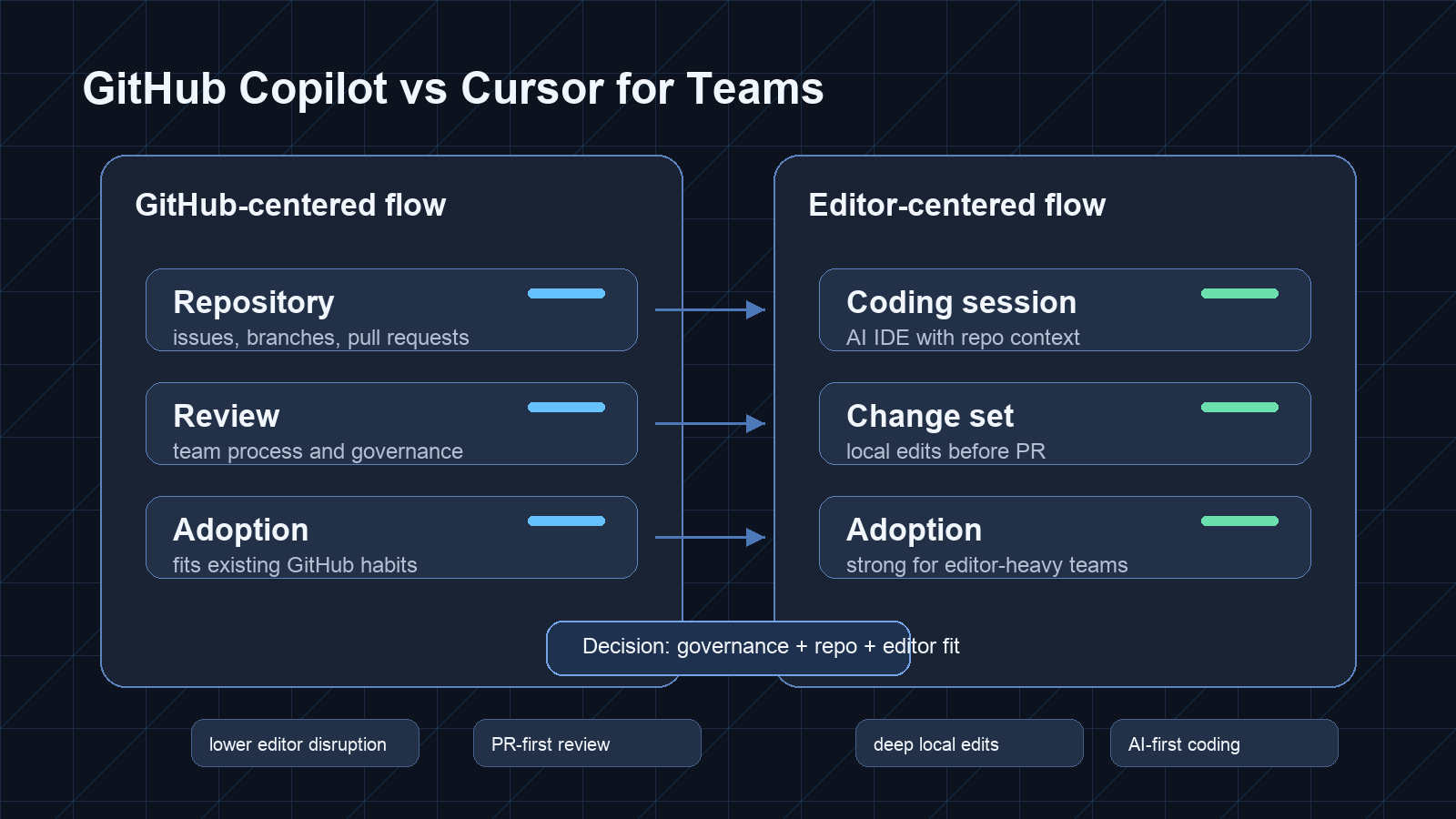
For teams, GitHub Copilot vs Cursor is less about which assistant feels more impressive in a demo and more about where the team wants AI to live. GitHub Copilot is usually evaluated as a GitHub-centered coding assistant that can fit existing repository, pull request, and organization workflows. Cursor is usually evaluated as an AI-first editor experience built around coding sessions, repo context, and direct code changes inside the editor.
Choose the GitHub-centered path if your team wants lower editor disruption, easier alignment with existing GitHub workflows, and a clearer path for review habits. Choose the editor-centered path if your team is willing to standardize around an AI coding environment and wants the assistant closer to files, terminals, and local implementation.
The best choice may also be mixed: one default assistant for broad adoption and one editor-first tool for heavier implementation work.
Teams also considering the former Windsurf editor should separate the current desktop product from Devin's delegated cloud workflow. The Devin vs Cursor vs Windsurf guide explains that boundary before procurement.
Best For
| Situation | Better starting point | Why |
|---|---|---|
| Team already works heavily in GitHub | GitHub Copilot | It aligns with repository, branch, and pull request habits |
| Developers want an AI-first editor | Cursor | It puts chat and code changes close to the local workspace |
| Team uses mixed editors | GitHub Copilot | Less pressure to move everyone into one editor |
| Small team wants fast implementation support | Cursor | Editor-centered context can feel faster during active coding |
| Larger team needs governance checkpoints | GitHub Copilot | Evaluate admin, policy, and organization fit first |
| Team is testing agentic workflows | Either, with strict review | The process matters more than the brand name |
Side-by-Side Workflow Comparison
| Team workflow area | GitHub Copilot | Cursor |
|---|---|---|
| Primary adoption model | Add AI assistance to existing development workflow | Move more work into an AI-first editor |
| Editor choice | Better fit when the team has mixed editor habits | Better fit when the team accepts a shared editor experience |
| Repo workflow | Stronger fit for GitHub-centered teams | Strong during local repo editing and implementation |
| Pull requests | Natural evaluation point for review-heavy teams | Good for preparing changes before review |
| Code review | Fits teams that already review in GitHub | Requires clear rules for reviewing editor-generated changes |
| Onboarding | Easier if GitHub is already central | Easier if new developers adopt the editor quickly |
| Governance | Check organization controls, policy, and data handling | Check workspace access, team settings, and data handling |
| Main risk | Treating suggestions as approved because they appear inside familiar workflow | Letting large editor-generated diffs bypass normal review |
The key distinction is not intelligence. It is operating model. GitHub Copilot is easier to frame as an assistant added to the existing software delivery system. Cursor is easier to frame as a coding environment where AI is part of the primary work surface.
For teams, the operating model affects training, support, policy, and review quality. A tool that is excellent for one senior developer may not be the best default for a larger team.
How to Choose
Start by mapping where code decisions happen. If the team debates work in issues, branches, pull requests, and review comments, a GitHub-centered workflow deserves serious weight. If the team’s main bottleneck is implementation speed inside a complex codebase, an AI-first editor may deserve more attention.
Then run a controlled trial. Do not ask developers only which tool they like. Ask what happens to review. Are diffs smaller? Are tests better? Can reviewers understand the change? Does the tool reduce repetitive work without hidden cleanup?
| Decision criterion | GitHub Copilot is stronger when... | Cursor is stronger when... |
|---|---|---|
| Editor standardization | The team uses several editors | The team can align around one AI-first editor |
| Review workflow | Pull requests are the source of truth | Local implementation speed is the main bottleneck |
| Onboarding | New hires already use GitHub workflows | New hires can learn the editor as part of setup |
| Refactoring | Changes are usually small and reviewed in PRs | Developers need deep local assistance across files |
| Governance | Admin policy and organization fit are decisive | Workspace-level workflow is more important |
| Team culture | Developers prefer incremental tooling | Developers are willing to change daily habits |
Use normal tasks, not synthetic prompts. Include a bug fix, a test update, a small feature, and a refactor. Require every AI-assisted change to pass the same review bar as human-written code.
When not to choose GitHub Copilot: if your team’s main need is an AI-first environment for multi-file editing, planning, and local implementation, a lighter assistant inside the existing workflow may feel too limited.
When not to choose Cursor: if your team cannot tolerate editor migration, has strict procurement requirements, or needs a very gradual rollout across mixed developer habits, the switching cost may outweigh the coding-session benefit.
Pricing and Plan Checkpoints
Avoid comparing GitHub Copilot and Cursor using stale pricing tables. Team pricing, usage policies, model access, limits, administrative settings, and billing structure can change. Check current terms directly before publishing procurement recommendations or making a company-wide decision.
| Checkpoint | Why teams should care |
|---|---|
| Seat assignment | Teams need to know who gets access: full-time engineers, contractors, reviewers, or only pilot users |
| Billing owner | Centralized purchasing is different from individual reimbursement |
| Usage boundaries | Heavy chat, multi-file edits, and agentic workflows may not behave like light autocomplete |
| Admin controls | Managers need policy, access, and offboarding workflows |
| Data handling | Legal and security teams need clear rules for code access and retention |
| Editor support | Mixed IDE teams need to know whether adoption creates friction |
| Auditability | Reviewers need to see what changed, why, and where risk remains |
The practical buyer question is: can the team roll this out without weakening review discipline? A cheaper plan that increases unreviewed code is not cheaper in practice.
Risks and Caveats
Both tools can produce confident but incorrect code. The risk increases when developers accept large suggestions, skip tests, or let AI rewrite unfamiliar areas without a clear change request. Team policy should define what can be generated freely and what requires extra review.
High-risk areas include authentication, authorization, payment logic, infrastructure, migrations, secrets handling, encryption, customer data paths, and compliance-related code. In these areas, AI assistance should be treated as drafting, not approval.
There is also a culture risk. If one group adopts an AI-first editor and another stays with a GitHub-centered workflow, code style and review expectations can diverge. Teams should define acceptable diff size, required tests, and review ownership.
Do not overfit to one developer’s preference. Cursor may feel stronger to an editor-first developer. GitHub Copilot may feel safer to a team lead managing adoption across many repositories.
Bottom Line
For teams, GitHub Copilot is usually the safer starting point when GitHub workflow, mixed editors, and governance matter most. Cursor is usually the stronger starting point when the team wants an AI-first coding environment and is comfortable changing daily development habits.
The better answer is not purely feature-based. It is a rollout decision. Choose the tool that improves implementation speed without weakening tests, reviews, access control, or code ownership.
FAQ
Is GitHub Copilot better than Cursor for teams?
It can be a better starting point for teams that already organize work around GitHub and want less editor disruption. It is not automatically better for teams that want an AI-first coding environment.
Is Cursor better for individual developers?
Cursor can be strong for developers who want AI assistance close to the editor and local repository. Teams still need to evaluate rollout, review discipline, and data handling.
Can a team use both?
Yes. A team can use one tool as the broad default and another for specialized implementation work, but it should define review standards so workflows do not diverge.
What should a team test first?
Test real tasks: a bug fix, a small feature, a refactor, and a test update. Compare diff quality, review time, and whether the tool fits existing habits.
What is the main risk?
Letting AI-generated changes bypass the normal engineering review process.