8 Best Lovable Alternatives for AI App Building in 2026
Last updated: 2026-07-17
Lovable is a strong prompt-first platform for building and publishing full-stack web apps. It can generate a frontend, backend, database, authentication, and integrations, while also letting you sync the code to GitHub. That makes it a more capable baseline than a simple landing-page generator.
But the best Lovable alternative depends on what happens after the first prompt. Some builders give developers more control over the running code. Others are better for visual editing, internal tools, or launching without ever touching code.
Quick verdict
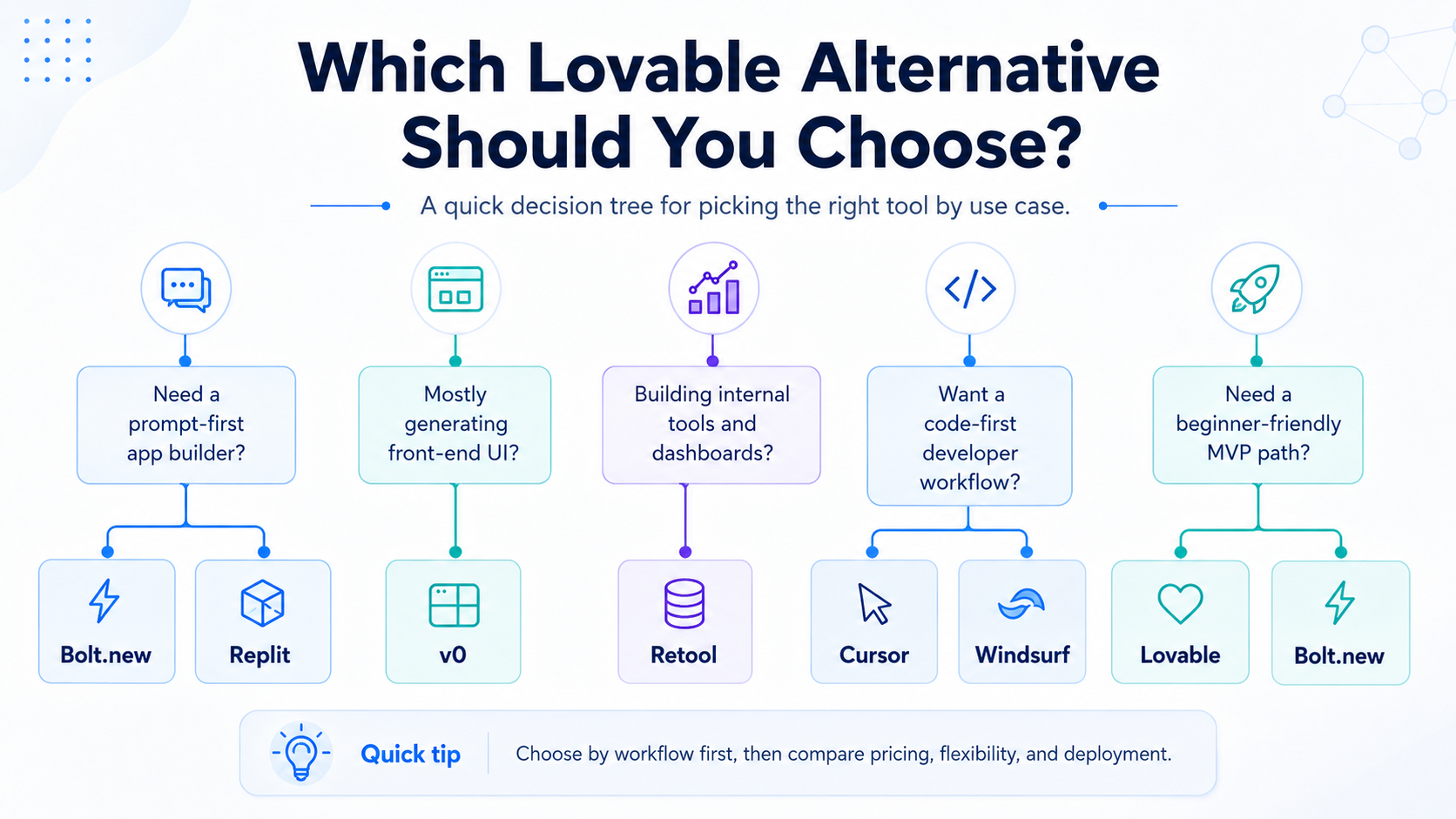
If you want the closest overall alternative, start with Bolt.new. Choose v0 for a polished Next.js and Vercel workflow, Replit Agent for an AI builder inside a complete cloud coding environment, Base44 for an approachable no-code-style full-stack builder, and Bubble when visual maintenance matters more than owning a conventional codebase.
For a narrower job, choose Retool for internal software, Hostinger Horizons for a hosted business web app, or Cursor when you already have a repository and want an AI coding agent rather than a prompt-to-app platform.
| Lovable alternative | Best for | Backend and deployment | Code path | Main tradeoff |
|---|---|---|---|---|
| Bolt.new | Closest browser-based alternative | Built-in database and hosting | Edit and run code in the browser | Token usage can rise during repeated debugging |
| v0 | UI-first full-stack apps | Vercel deployment and database integrations | GitHub sync and Next.js-oriented output | Best fit assumes a modern web stack |
| Replit Agent | Building, debugging, and publishing in one workspace | Database, cloud runtime, and publishing | Full cloud IDE | More developer surface area than Lovable |
| Base44 | Non-technical full-stack experiments | Built-in database, authentication, integrations, and hosting | Platform-led workflow | Advanced production features may require an upgrade |
| Bubble | Visual no-code products | Built-in database, logic, hosting, and deployment | Visual editor rather than conventional source code | Platform lock-in is the central tradeoff |
| Retool | Internal tools and operational apps | Data connectors, permissions, and managed deployment | Low-code with optional custom code | Not intended as a general consumer-app builder |
| Hostinger Horizons | Small-business web apps and websites | Hosting, domains, backend, and common integrations | Prompt and visual editing | Less attractive for engineering-led handoff |
| Cursor | Existing codebases and developer-owned apps | Bring your own stack and deployment | Direct repository control | Not a no-code prompt-to-app experience |
How we evaluated the alternatives
The useful question is not which product can make the flashiest first screen. It is which workflow still works after the demo.
We compared each option across five practical checkpoints:
- First build: Can a new user turn a prompt into a working app rather than a static mockup?
- Backend: Can it handle data, authentication, server logic, or integrations without extensive manual setup?
- Iteration: Can you correct a bad result precisely, inspect what changed, and keep developing the project?
- Handoff: Can a developer take over, or can a non-developer safely maintain the app?
- Launch: Is there a clear path from preview to a live URL and a production workflow?
We did not rank by a single pricing number. AI-builder plans and credit limits change frequently, and the cheapest first prompt is not always the cheapest finished product.
1. Bolt.new: best overall Lovable alternative
Bolt.new is the closest direct competitor in this list. It builds websites and web apps from prompts inside the browser, but the working environment feels closer to a development workspace. You can inspect the project, run it, edit it, and publish it without moving between several tools.
Bolt also includes hosted infrastructure for common app needs. Its current workflow can provision a database and support authentication, file storage, server functions, logs, and deployment. You can also choose an external backend such as Supabase when that better matches the project.
Choose Bolt.new when:
- You want prompt-to-app speed with more visibility into the implementation.
- You expect to test, debug, and edit the running project in the same browser tab.
- You are comfortable seeing code even if AI does most of the work.
- You want a close Lovable comparison before changing your entire workflow.
Stay with Lovable when:
- You prefer a more guided, product-oriented chat workflow.
- Non-technical collaborators will make most of the changes.
- You value Lovable's GitHub sync and workspace model more than an in-browser development environment.
The main caution is usage efficiency. Repeated prompting and debugging can consume a meaningful token allowance, so define the app, data model, and acceptance criteria before asking for large changes.
Read the detailed Lovable vs Bolt.new comparison.
2. v0: best for UI-first Next.js apps
v0 is the strongest option when the interface is the center of the project. It is particularly well suited to landing pages, dashboards, SaaS interfaces, and full-stack web apps that fit the Next.js and Vercel ecosystem.
It is no longer useful to describe v0 as only a UI mockup generator. Its full-stack workflow supports server actions or API routes, database integrations, environment variables, GitHub sync, and deployment to Vercel. The difference is emphasis: v0 starts from a strong frontend and modern web-development workflow.
Choose v0 when:
- Visual quality and frontend iteration are the first priority.
- You already use Next.js, GitHub, or Vercel.
- A developer will eventually maintain the application.
- You want generated work to enter a familiar repository and deployment flow.
Stay with Lovable when:
- You want a general prompt-to-product workflow with fewer framework decisions.
- The main builder is a founder or operator rather than a frontend developer.
- You prefer Lovable's built-in path for full-stack app generation.
Read the detailed Lovable vs v0 comparison.
3. Replit Agent: best all-in-one coding workspace
Replit Agent is a good alternative when you want AI generation and a complete cloud development workspace. Agent can plan, write code, run the project, debug problems, and improve the app. Replit then provides an editor, database options, cloud runtime, collaboration, and publishing.
That broader environment is the advantage and the tradeoff. It gives you more places to inspect and change the project than Lovable, but it also exposes more development concepts.
Choose Replit Agent when:
- You want to learn from or edit the generated code.
- You need one browser-based place to build, test, debug, and publish.
- You are creating experiments, educational projects, or custom full-stack apps.
- You may bring in a developer without migrating to a new workspace.
Stay with Lovable when:
- You want the shortest path from product description to an app.
- You do not want an IDE-style environment.
- Most changes will be expressed as product instructions, not code edits.
Read the detailed Lovable vs Replit Agent comparison.
4. Base44: best low-friction full-stack option
Base44 is a compelling Lovable alternative for people who want a complete app without assembling infrastructure. It can generate the interface, logic, database, authentication, and integrations from natural-language instructions. Its chat workflow also separates direct building, discussion, and targeted visual editing.
That makes Base44 especially approachable for prototypes, simple internal tools, client portals, and founder-led applications. A free entry tier makes it possible to test the workflow before committing, although production-oriented capabilities and heavier usage move into paid plans.
Choose Base44 when:
- You want database and authentication included with minimal setup.
- You prefer a no-code-style experience over a code editor.
- You are testing several app concepts before choosing a long-term stack.
- You want planning and visual edits inside the same builder.
Stay with Lovable when:
- GitHub-based ownership and developer collaboration are central requirements.
- You already rely on Lovable Cloud or its Supabase workflow.
- You want a more established path from AI generation to a conventional repository.
Before choosing Base44 for a long-lived product, verify which backend functions, connectors, domains, staging features, and code controls are included in the plan you expect to use.
5. Bubble: best visual no-code alternative
Bubble is different from code-generating tools. Its AI builder can create a working app with a frontend, backend, database, logic, and sample data, but the result remains inside Bubble's visual development platform.
For a non-technical owner, that can be a feature. The app can be inspected and changed through a visual editor without learning React or debugging generated files. Bubble also has a mature workflow for data, privacy rules, plugins, APIs, and deployment.
Choose Bubble when:
- The long-term owner must maintain the product visually.
- You are building a marketplace, portal, workflow app, or database-driven product.
- You prefer one managed platform for design, logic, data, and hosting.
- Conventional source-code ownership is not a hard requirement.
Stay with Lovable when:
- You want editable generated code and GitHub sync.
- A software team may take over the project later.
- You want to deploy outside the builder's own runtime.
Bubble's key decision is not “Can it build the app?” It is “Do we want the app to remain a Bubble application?” Decide that before investing in complex workflows.
6. Retool: best for internal tools
Retool is the right alternative when the application is for employees, operations, support, finance, or administration. It focuses on connecting interfaces to business data and services, then managing access, permissions, workflows, and deployment.
Retool's AI app generation can produce an initial internal app from a prompt, but its real advantage is everything around the interface: production data connections, governed access, reusable components, and operational workflows.
Choose Retool when:
- The app is an admin panel, dashboard, approval flow, or operations tool.
- It must connect to databases and business APIs.
- Permissions, auditability, and organizational governance matter.
- Shipping an internal workflow matters more than owning every frontend detail.
Stay with Lovable when:
- You are launching a public consumer or SaaS product.
- Brand experience and public-facing design are primary requirements.
- You want a general-purpose codebase rather than an internal-tool platform.
Read the detailed Retool vs Lovable comparison.
7. Hostinger Horizons: best for an all-in-one business launch
Hostinger Horizons is designed for people who want to describe a website or web app, edit it conversationally or visually, and put it online with managed infrastructure. Its current offering combines hosting, domain tools, databases, user accounts, file storage, and common business integrations.
This is a practical fit for booking tools, customer portals, simple stores, lead-generation products, and small-business sites where the owner wants one vendor and one publishing flow.
Choose Hostinger Horizons when:
- Hosting and business website features should be bundled with the builder.
- The owner is non-technical and expects to make visual or prompt-based edits.
- You need a straightforward path to a domain and a live product.
- The application is tied closely to a small-business web presence.
Stay with Lovable when:
- Code handoff and GitHub collaboration are more important than bundled hosting.
- The product requires a developer-led architecture.
- You want a builder focused more narrowly on full-stack application generation.
Complex apps still require careful prompting and some understanding of web development, even when the platform removes most setup.
8. Cursor: best for developers who want full control
Cursor is not a direct no-code replacement for Lovable. It is an AI coding environment for working on a real codebase. Its Agent mode can explore a repository, edit multiple files, run commands, and fix errors, while other modes support read-only investigation or targeted edits.
Cursor belongs on this list because some people searching for a Lovable alternative are actually looking for more control, not another app generator.
Choose Cursor when:
- You already have a repository or know how you want the stack organized.
- You need precise code review, testing, refactoring, and debugging.
- Deployment and infrastructure should remain under your control.
- A developer is responsible for the product.
Stay with Lovable when:
- You want an app generated before thinking about a repository.
- The primary builder does not work in a code editor.
- Managed app creation is more important than engineering control.
For a hybrid workflow, you can start in Lovable, sync the project to GitHub, and continue development in an AI coding editor. You do not always need to choose only one tool.
Best Lovable alternative by use case
| Use case | Best first choice | Why |
|---|---|---|
| Closest Lovable replacement | Bolt.new | Similar prompt-to-app workflow with a browser development environment |
| UI-heavy SaaS or landing page | v0 | Strong frontend generation and Vercel-oriented deployment |
| Build and code in one browser workspace | Replit Agent | AI generation, IDE, runtime, and publishing together |
| Beginner full-stack experiment | Base44 | Database, authentication, integrations, and hosting with little setup |
| Long-term visual maintenance | Bubble | Mature visual editor for design, logic, and data |
| Internal operations app | Retool | Data connections, permissions, and governance |
| Small-business site or portal | Hostinger Horizons | Builder, hosting, domain, and business features together |
| Existing repository | Cursor | Direct codebase control and agentic development |
Which Lovable alternatives can you try for free?
Lovable, Bolt.new, v0, Replit, Base44, and Bubble currently provide a way to start building without paying. The important limitation is that “free” means different things:
- Some plans limit AI messages, tokens, or credits.
- Some are intended for development and require payment to launch a production app.
- Some include a hosted project but add platform branding or expiration rules.
- Backend functions, connectors, custom domains, private projects, or extra deployment capacity may require an upgrade.
Use a free tier to answer one question: Can this tool build and revise my actual app workflow? Do not choose a production platform based only on the largest-looking free allowance.
See the focused guide to free Lovable alternatives.
A practical three-step decision
1. Decide who owns the app after launch
If a non-technical founder will own it, prioritize Lovable, Base44, Bubble, or Hostinger Horizons. If a developer will own it, prioritize Bolt.new, v0, Replit, or Cursor.
2. Build one difficult workflow
Do not compare tools using only a landing page. Test authentication, a real data model, one integration, an error state, and a deployment update. The hardest workflow reveals more than the first generated screen.
3. Test the handoff before committing
Export or sync the code when supported. Invite the future maintainer. Confirm how domains, environment variables, data, logs, backups, and billing work. A tool is only fast if the second week is also fast.
Final recommendation
For most people seeking a direct Lovable alternative, Bolt.new is the best first comparison. It covers a similar browser-based prompt-to-app job while giving more of a development-workspace feel.
Choose v0 when frontend quality and the Vercel ecosystem matter most. Choose Replit Agent when you want a complete cloud coding environment. Choose Base44 or Bubble when the long-term maintainer is non-technical. Choose Retool for internal tools, Hostinger Horizons for an all-in-one business launch, and Cursor only when the real requirement is developer control.
The fastest way to decide is to give two finalists the same app brief, the same difficult workflow, and the same handoff test.
FAQ
What is the best alternative to Lovable?
Bolt.new is the closest overall alternative for browser-based prompt-to-app building. v0 is better suited to UI-first Next.js projects, Replit Agent to an all-in-one cloud coding workflow, and Bubble to visual no-code maintenance.
Is there a free Lovable alternative?
Yes. Bolt.new, v0, Replit, Base44, and Bubble currently have free ways to start building. Their restrictions differ across AI usage, publishing, backend features, branding, and production deployment, so verify the current plan before selecting a long-term platform.
Is Bolt.new better than Lovable?
Bolt.new may be better when you want to inspect, run, and edit the project inside a browser development environment. Lovable may be better when you want a guided product-building workflow and straightforward GitHub synchronization.
Is v0 better than Lovable?
v0 is often the better fit for UI-heavy apps built around Next.js, GitHub, and Vercel. Lovable is often easier for a general prompt-to-full-stack workflow led by a founder or product operator.
Can I export code from Lovable?
Lovable can connect a project to GitHub with two-way synchronization on the default branch. That gives you a copy of the code, supports local development, and allows deployment outside Lovable.
Which Lovable alternative is best for a non-technical founder?
Base44 and Bubble are strong options for non-technical owners. Base44 emphasizes prompt-driven full-stack generation, while Bubble provides a mature visual environment for maintaining the app after generation.